1. Saving takes one tap, so saves pile up
P2 saves about 20 reels a day. P1 has 2,162 screenshots, mixing useful things with things only useful "for the next 10 seconds".
If I like something, I can just save it and continue scrolling.P4
Project 01 · UX research
Saving something online takes one tap. Finding it again can take fifteen minutes, or never happen at all. We researched how people, especially designers, save things online and why they can't get them back.
01
UI/UX designers who save screenshots for inspiration struggle to find a specific reference when they need it during a design task. Their saves are scattered across the gallery and other apps, and can't be searched by what they look like. They end up scrolling through hundreds of images or searching online again, which costs time and breaks their design flow.
Our first guide focused only on designers and their screenshots. We broadened it to cover anything people keep for later, so we wouldn't assume the problem was specific to designers. We also added a timed live task where participants try to find a save while we watch, and a question on frequency and cost to test whether the problem is worth solving.
02
Five one-on-one interviews, about 15–20 minutes each, with people who regularly save content online. Three of them work in design.
| ID | Role | What they mostly save | Where they save |
|---|---|---|---|
| P1 | Instructional designer | Finance tips, products, places, quotes, news | Screenshots, WhatsApp self-chat, Pinterest, Google Keep, Chrome tabs, YouTube, Amazon wishlist |
| P2 | Not recorded | Travel reels, poetry, quotes (~20 reels a day) | Instagram saves, screenshots, gallery favourites, WhatsApp |
| P3 | UX & graphic designer | Design reels and inspiration | Instagram collections, Pinterest, screenshots, WhatsApp |
| P4 | Hobbyist (photography, pottery, drawing) | Creative references and techniques | Instagram, Pinterest, YouTube |
| P5 | UX designer | UI/UX inspiration, recipes | Instagram, WhatsApp, screenshots, Notion, Google Sheets |
03
Saving isn't the problem. Getting things back is.
P2 saves about 20 reels a day. P1 has 2,162 screenshots, mixing useful things with things only useful "for the next 10 seconds".
If I like something, I can just save it and continue scrolling.P4
People first have to remember which app they saved it in. If they can't recall it, search is no use.
It was not easy, like finding needles in a haystack.P2
Nobody browses saves for fun. They return when they start a design, cook, revisit investments, or feel a creative urge after work.
When I'm doing UX work and remember I saved something related, I try to find it. It costs me time.P5
The cost is time, and sometimes motivation. P4 searches for 10–15 minutes, then settles for something similar.
By the time I've finished searching, I don't feel like doing the thing anymore.P4
P5's Notion page hit its free limit. P4 has Instagram collections but doesn't use them consistently.
Forget it, I'll make something else.P3
P3's Instagram saves stopped showing up. P1's shoe screenshot was gone, and she couldn't tell why.
| Workaround | Who | Why |
|---|---|---|
| Send links or screenshots to themselves on WhatsApp | P1, P2, P3, P5 | Newest stays on top, works on phone and laptop. P1 adds a word or two to search later. |
| Screenshot instead of saving in the app | P1, P2, P3, P5 | One tap, no typing, survives the post being deleted. |
| Notion page or Google Sheet of links | P5 | One place for links. Notion dropped after hitting its storage limit. |
| Gallery favourites | P2 | Keep saved audio easy to reach. |
| Chrome tabs left open | P1 | A reading list: read it, then close it. |
04
We compared five direct competitors that save most of the formats our participants use: reels, links, videos and screenshots. We rated each one on saving, finding, context, resurfacing, trust, platforms and cost.
| App | Screenshots | One search across saves | Reason at save time | Resurfacing | Price (US) |
|---|---|---|---|---|---|
| mymind | Yes | Yes AI search | No | Partly | $4.99–12.99/mo |
| Raindrop.io | Partly | Yes titles & tags | No | No | $3/mo |
| Snug | Yes | Yes keyword, topic | No | Yes | Free |
| Save for Later | ? | Yes keyword, platform | Partly | Yes | $1.99/mo |
| Recall | Yes | Yes natural language | No | Paid | $10/mo |
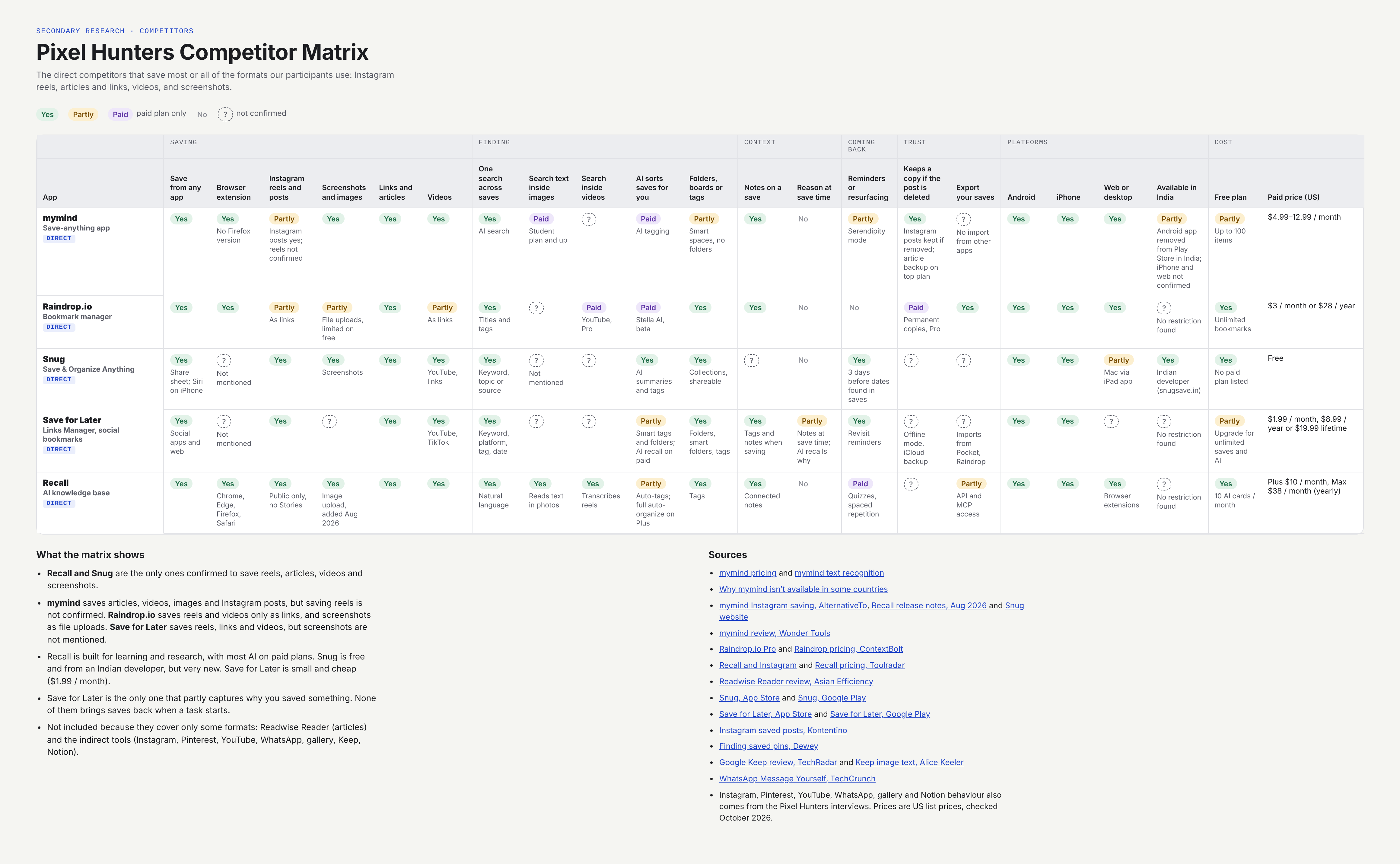
Only Save for Later partly captures why something was saved. No one else does.
None of them bring saves back when a task starts, which is exactly when our participants go looking.
Only Recall and Snug are confirmed to save reels, articles, videos and screenshots. Recall puts most of its AI behind a paywall.
05
From scrolling past something good to giving up on finding it. This map combines all five interviews into one journey.
This could be useful later.
I can just save it and continue scrolling.
I think I'll go back and look at them.
I saved something exactly like this…
Like finding needles in a haystack.
Forget it, I'll make something else.
On small screens, scroll the map sideways →
06
07
Low-fidelity first passes at the opportunity areas above, one screen per HMW.
—